

Open Registration
For the Open Registration model, students and/or other potential participants are directed to an online registration form. If you don't know who your participants will be in advance, this option could be a good solution for you.
When completing the registration form, users need to enter an email address, a username, and a password. Registrants are then able to edit their fundraising webpage and modify their settings, such as their goal. However, you’ll still need to provide a list of your Grades, Classes, or Teams. 
For open registration, the participants are shown the status of Open Registration:
Incomplete = Someone started the form and NEVER submitted it.
Approved = Form submitted, and registration is confirmed.
Paid Open Registrations Premium Package Feature 🔥
Your MyFunRun representative can assist you in setting up your paid registration options on the website.
To add or edit a paid registration option, go to Site Builder → Features → Fundraising → Paid Registration.
To add a new option, click the New Registration button and complete the form. 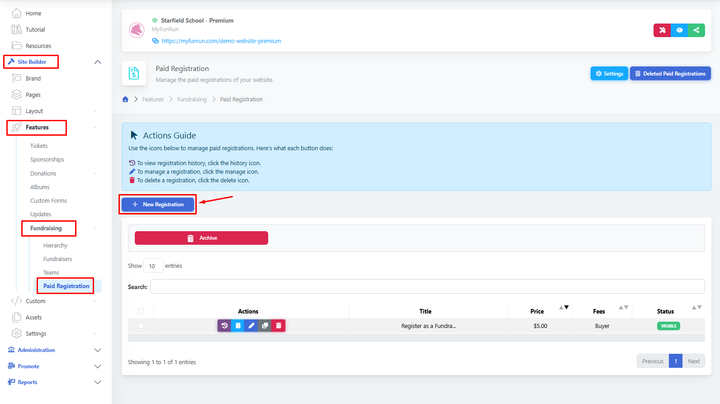
To view a report of paid registrations that were purchased, go to Site Builder → Reports → E-Commerce → Paid registrations.
Unpaid = Someone started the form, submitted it, and didn't pay.
Paid = Form submitted, and registration is confirmed/paid.