

Need to update or manage a participant’s details?
You can quickly edit a participant's profile, including name, team/group, fundraising goal, and more.
Go to Site Builder → Features → Fundraising → Fundraisers.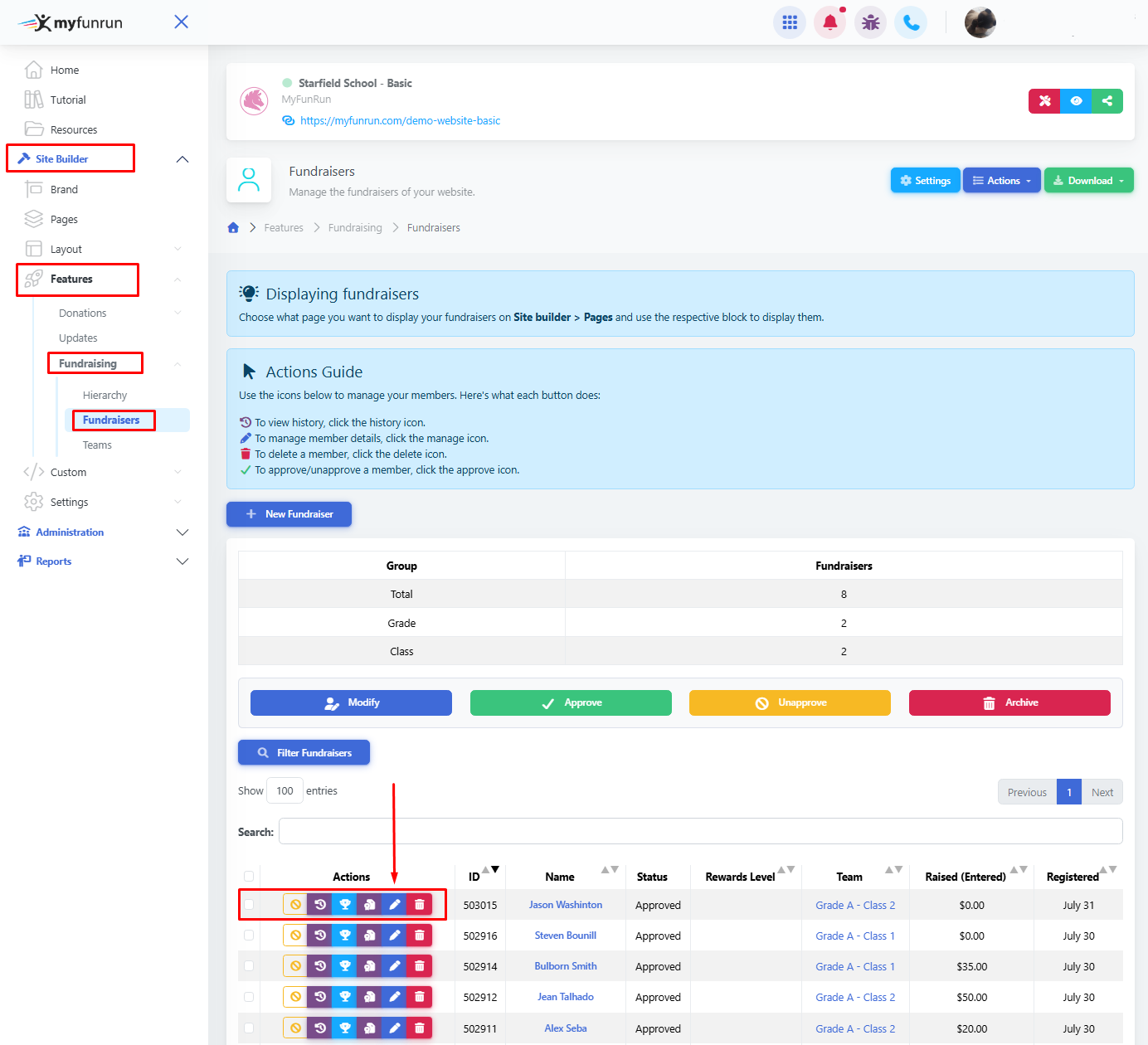
Edit
Locate the participant or fundraiser you want to edit and click the Edit pencil button next to their profile.
Update the desired information (name, team/group, etc.).
Depending on your needs and settings, you will be presented with multiple customization options, and you can also edit a specific goal for specific fundraisers.
Save your changes by clicking on the blue Confirm button.
Rewards
Click on the blue trophy icon to assign and track rewards for each fundraiser.
Archive
To archive a fundraiser, you can click the bin icon next to the fundraiser you want to archive.
You can only archive fundraisers that have not received any funds yet. If you need to archive a fundraiser that has received a donation, you need to transfer that participant's funds to another group or fundraiser before the fundraiser can be archived.
Keep in mind: You can only archive fundraisers that have not received any donations yet. If you need to archive a fundraiser that has received a donation, you need to transfer that participant's funds to another group or fundraiser before the fundraiser can be archived.