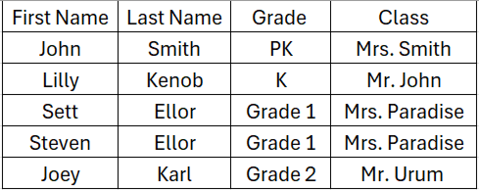

If using "Open Registration", participants can register through a form on the website. Regardless of what type of registration model you are using, you can also add participants through the dashboard. There are 2 ways you can add fundraisers through the Dashboard. Manually one by one, or you can import a bulk list of fundraisers in a .CSV format.
MyFunRun recommends using pre-registration. The fewer obstacles there are to registering, the more likely people are to participate. By pre-registering your participants, you guarantee a greater level of participation. It simplifies and streamlines the entire process.
Important notes regarding adding fundraisers:
Using Fundraisers' Emails
If you want your participants to be able to log in to manage their profile, then you must include the participant's email address. When you add a participant manually or through the upload a list and provide email addresses, an email invitation will be automatically sent to those participants letting them know they can login, that and a pin will be sent to them for them to successfully login and take control of their profile.
This is an entirely optional feature. We recommend that you not provide email addresses for fundraisers unless you want the fundraisers to be able to log in to update their profile and/or page, and if you want the fundraisers to receive an automated invitation to their profile.
Privacy
For Privacy reasons, we recommend including only the minimum amount of required information when adding fundraisers manually or when importing your spreadsheet. For example, if only using a last initial on the website, there is no need to provide the full last name in your spreadsheet. Click here to learn more about privacy options and the specific data to include in your import spreadsheet.
1) Manual Entry
To manually add a new fundraiser, go to Site Builder → Features → Fundraising → Fundraisers. Click the New Participant button, and complete the form.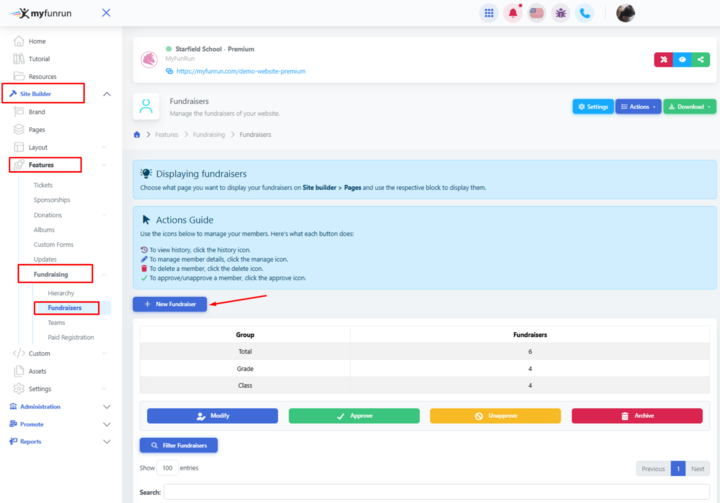
2) Importing a List, for Basic Package.
In order to make things easier, we provide a sample template with the exact structure you need to format your list. Please format your list in the exact same format (same fields and order of fields) as the template. Remember to only provide the minimum required information (emails, full names etc. are not required.
To download the sample template, click on Site Builder → Features → Fundraising → Actions → Download Template.
Format your spreadsheet with the same columns in the same order as the template available to download, and save in .CSV format.
To import your list, go to Site Builder → Features → Fundraising → Fundraisers → Actions → Import CSV.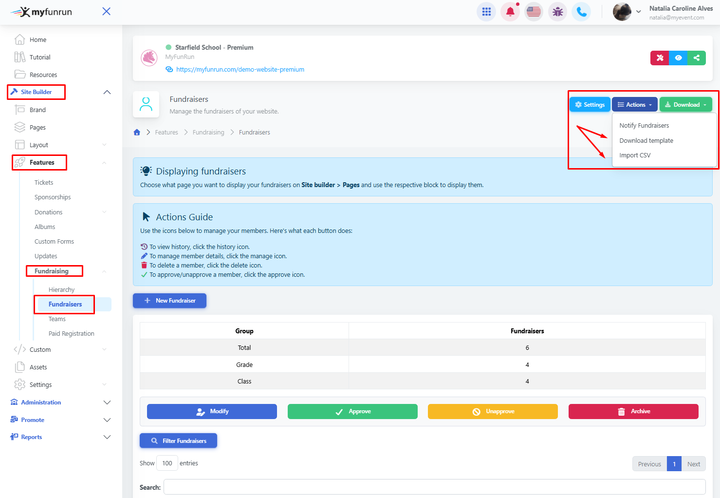
The following is the format for importing the list of students. following this template.